
Home/Case Study
Compiling PSeInt for the Web
Goal: bring the original PSeInt interpreter to the browser using WebAssembly, keeping language compatibility and a modern editing experience.
PSeInt is an educational environment for learning programming with pseudocode, with an interpreter designed to explain concepts and structures clearly. Official site: pseint.sourceforge.net.
Compilation
- Download the PSeInt source code.
- Create a devcontainer with a universal Linux base.
- Install the Emscripten SDK (emsdk) following the official guide.
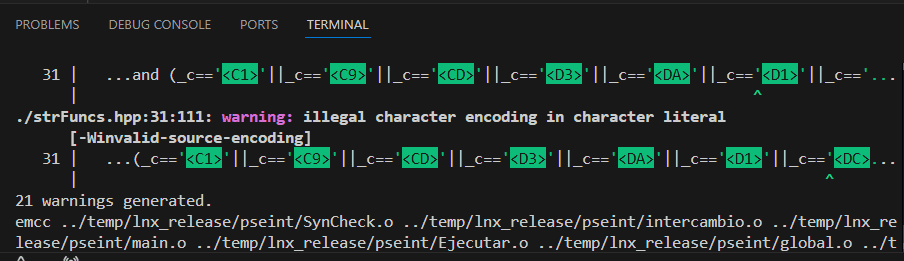
- Compile the core interpreter (pseint). During compilation, character encoding warnings appeared and needed fixes.
codespace ➜ /workspaces/pseint/pseint $ make GPP=emcc CXXFLAGS="-O3 -DNDEBUG -std=c++17 -DUSE_ZOCKETS" LDFLAGS="-s EXPORT_ALL=1 -s INVOKE_RUN=0 -s NO_EXIT_RUNTIME=1 -s EXPORTED_FUNCTIONS=['_main'] -s EXPORTED_RUNTIME_METHODS=['callMain','ccall','cwrap']" ARCH=lnxThe compilation output produces two artifacts:
- The .wasm binary.
- The JavaScript wrapper that prepares the environment before executing wasm. The wasm must be loaded before running.
Flags were added to allow calling the main method multiple times.
UI Integration
- Create a basic UI with a new Next.js project.
- Load the wasm module generated by Emscripten using a React useEffect.
useEffect(() => {
  if (window.Module?.callMain) {
    setReady(true);
    return;
  }

  window.Module = window.Module ?? {};
  window.Module.locateFile = (path: string) => `/${path}`;
  window.Module.print = (...args: unknown[]) => {
    console.log("[pseint]", ...args);
    if (onStdout) {
      onStdout(args.join(" "));
    }
  };
  window.Module.printErr = (...args: unknown[]) => {
    console.error("[pseint]", ...args);
    if (onStderr) {
      onStderr(args.join(" "));
    }
  };
  window.Module.onRuntimeInitialized = () => setReady(true);

  const existingScript = document.querySelector(
    'script[data-emscripten="pseint"]'
  ) as HTMLScriptElement | null;
  if (existingScript) {
    return;
  }

  const script = document.createElement("script");
  script.src = "/pseint";
  script.type = "text/javascript";
  script.async = true;
  script.dataset.emscripten = "pseint";
  script.onerror = () => {
    console.error("Error loading pseint.js");
  };
  document.body.appendChild(script);
}, []);
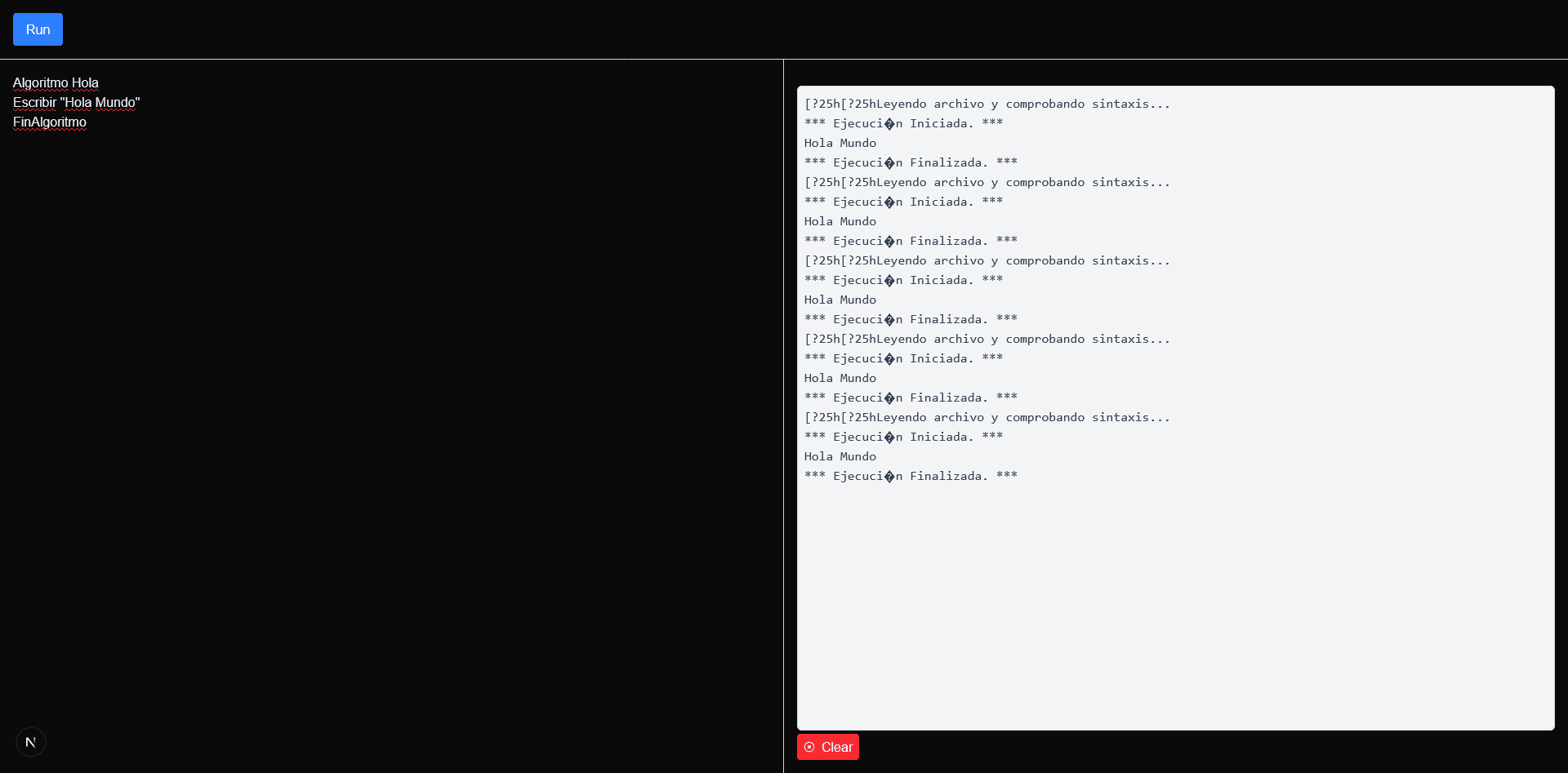
Connecting it to an editor and a panel to show stdout and stderr, it successfully runs a hello world written in the PSeInt language. Output appears on the right panel using the original interpreter compiled with Emscripten, showing how WebAssembly brings desktop binaries to the web.
Encoding issues
Some encoding problems appear in the output; these were already flagged during compilation.
Monaco Editor
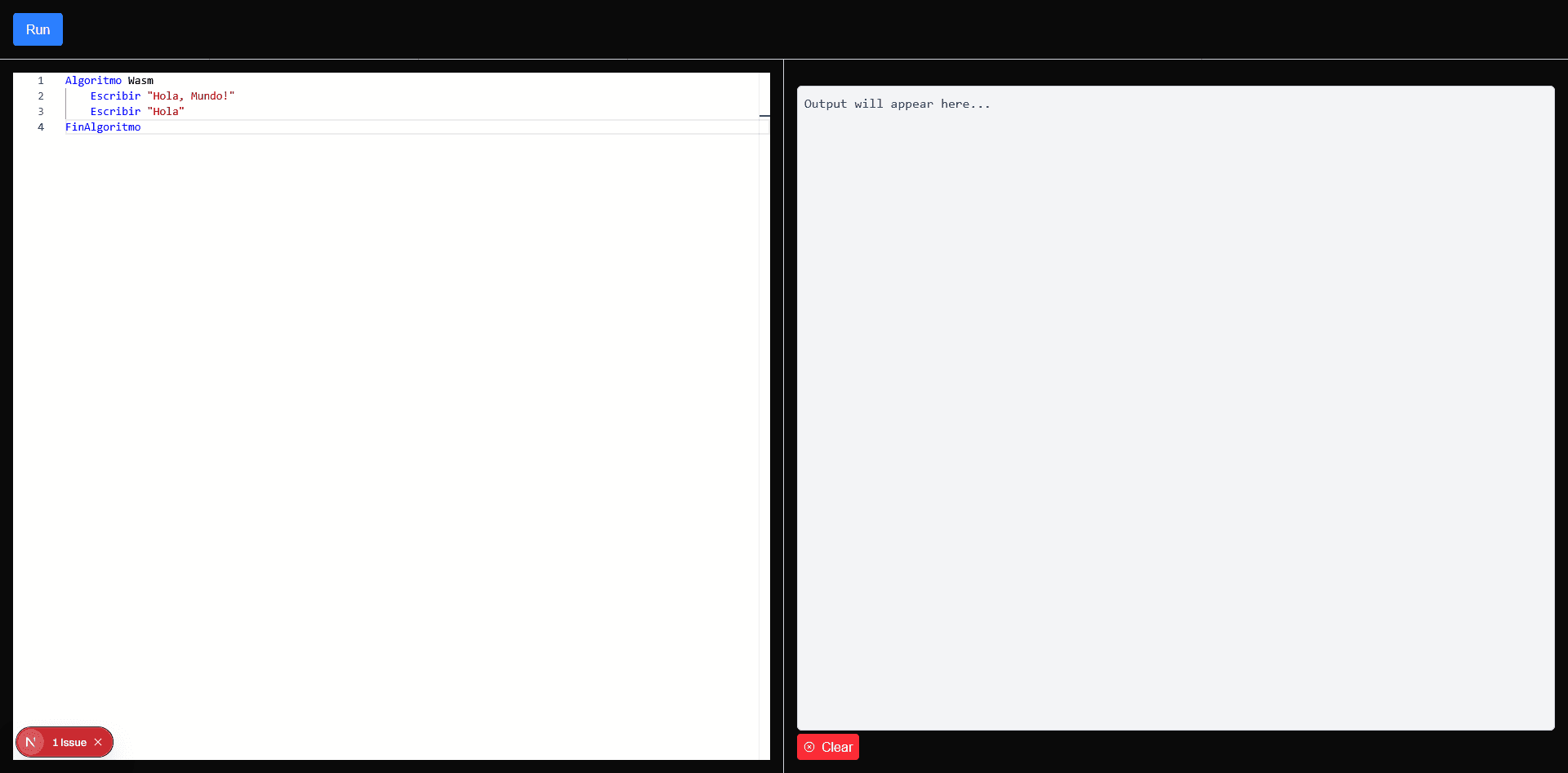
Because it is open source, we can load the Monaco Editor used by VS Code and extend it with a custom definition to highlight PSeInt syntax.
Next steps
- Advanced syntax highlighting.
- Inline error highlighting.
- Algorithm visualization.
- Sharing results.